Navigating the world of computer case sizes can feel like a labyrinth, especially when you are trying to balance powerful components with limited space or a specific aesthetic for your gaming setup. This comprehensive guide cuts through the confusion, offering practical advice for US gamers who want to optimize their PC build without breaking the bank or sacrificing performance. We delve into everything from tiny Mini ITX cases perfect for minimalist desks to sprawling Full Towers ready for custom liquid cooling and multiple GPUs. Whether you are upgrading on a budget, building your first rig, or just looking to improve airflow and cable management, understanding case dimensions is crucial. We will explore how different sizes impact component compatibility, thermal performance, and future upgrade potential, ensuring your gaming experience is smooth and enjoyable. Get ready to pick the perfect home for your hardware.
What are the primary computer case size categories for gamers in 2026?
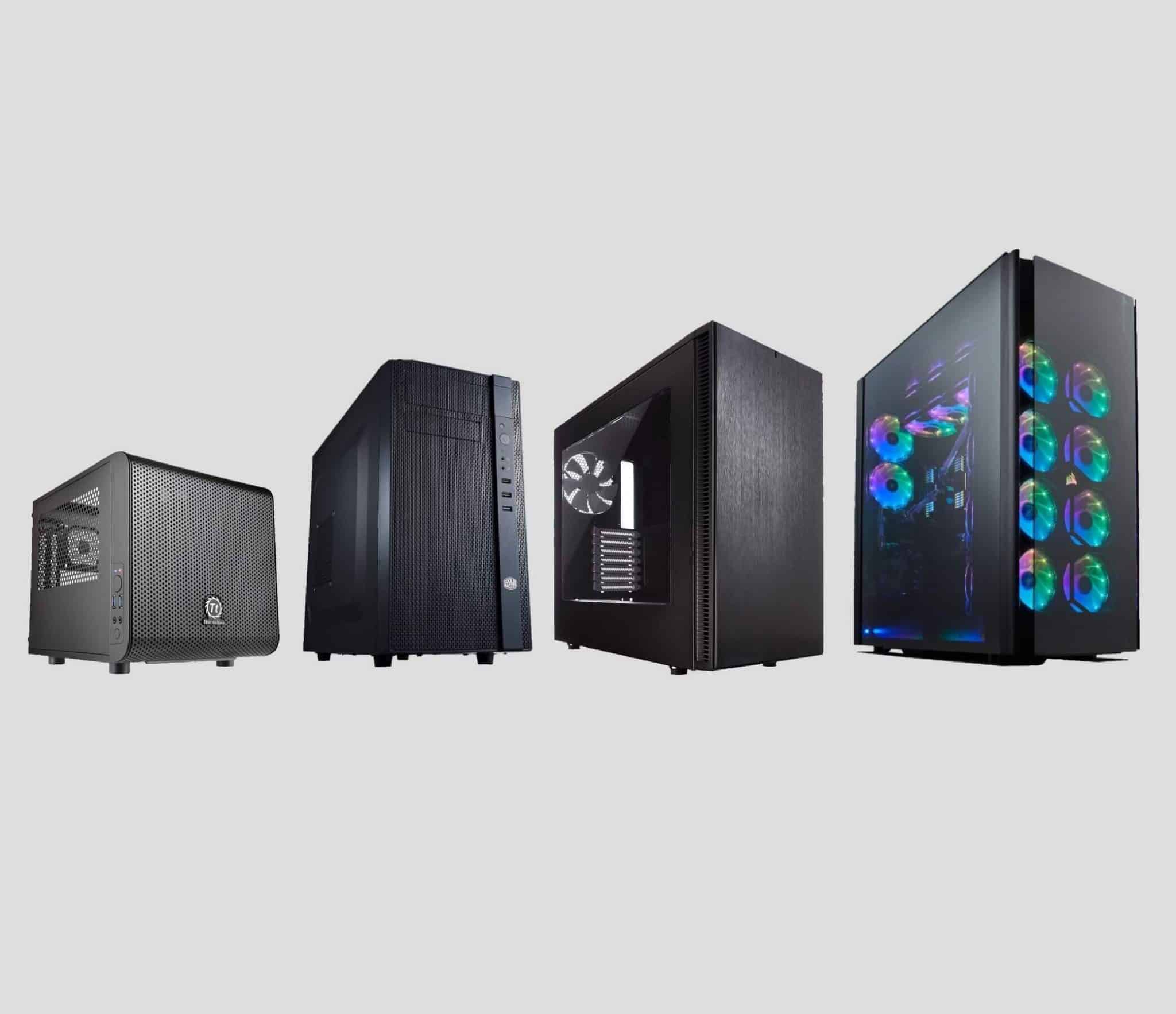
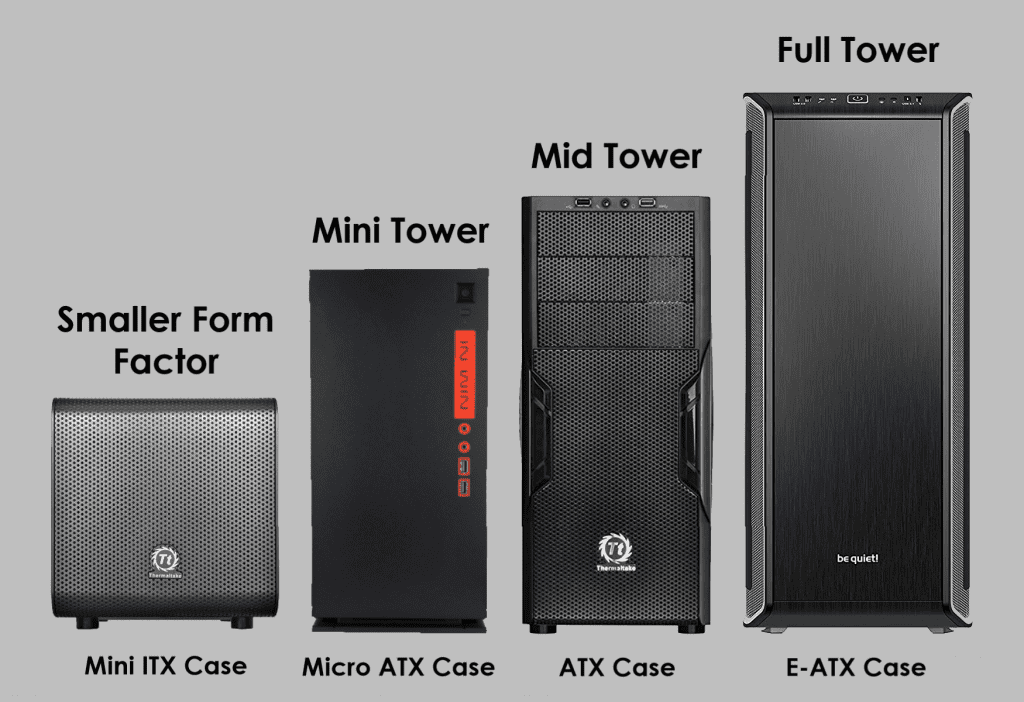
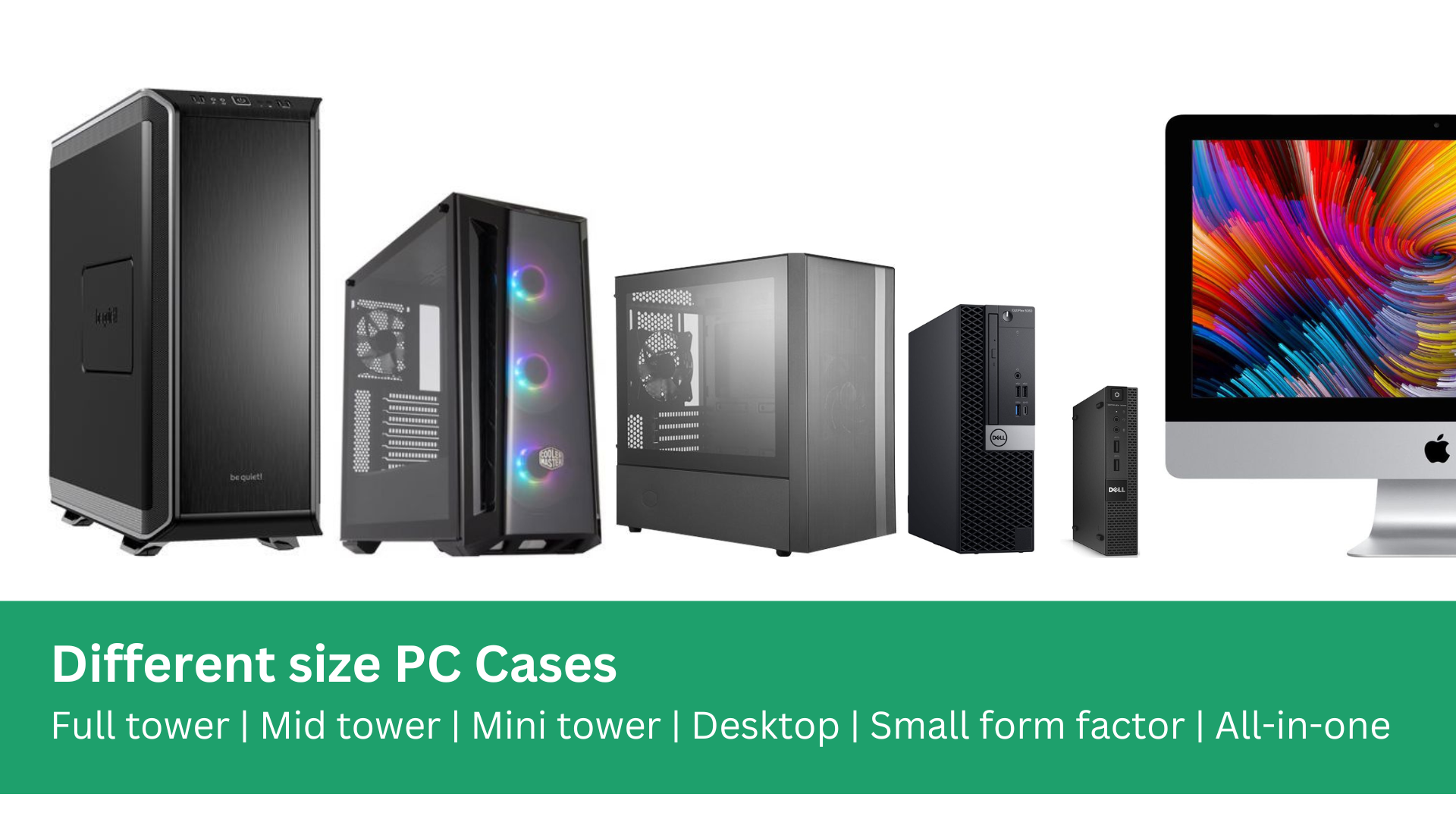
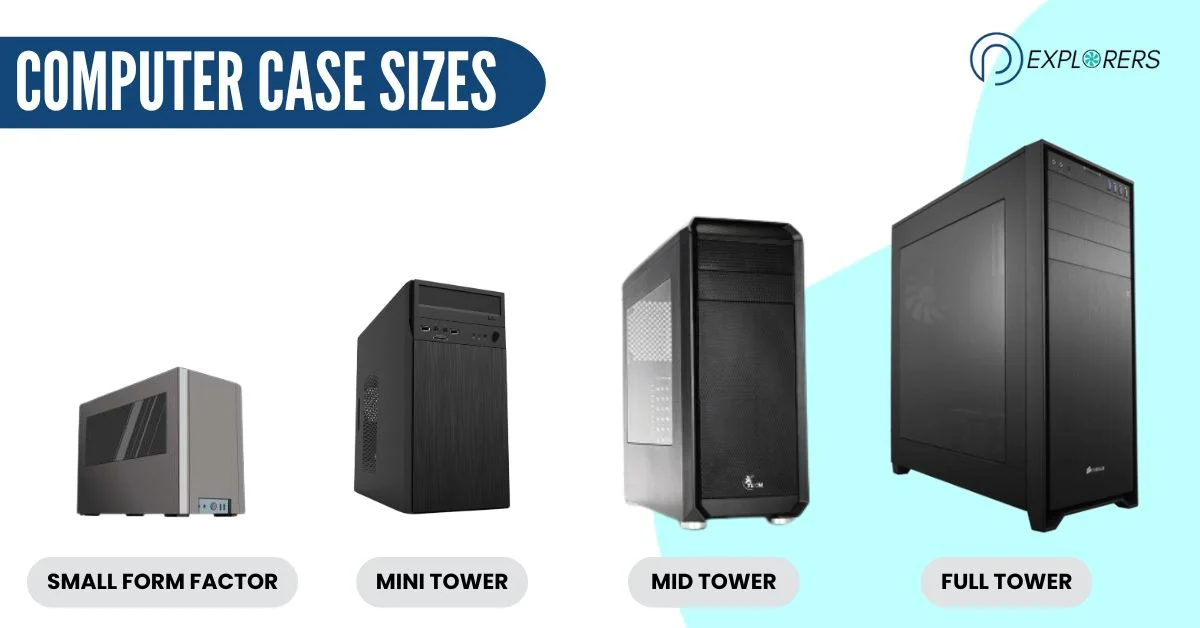
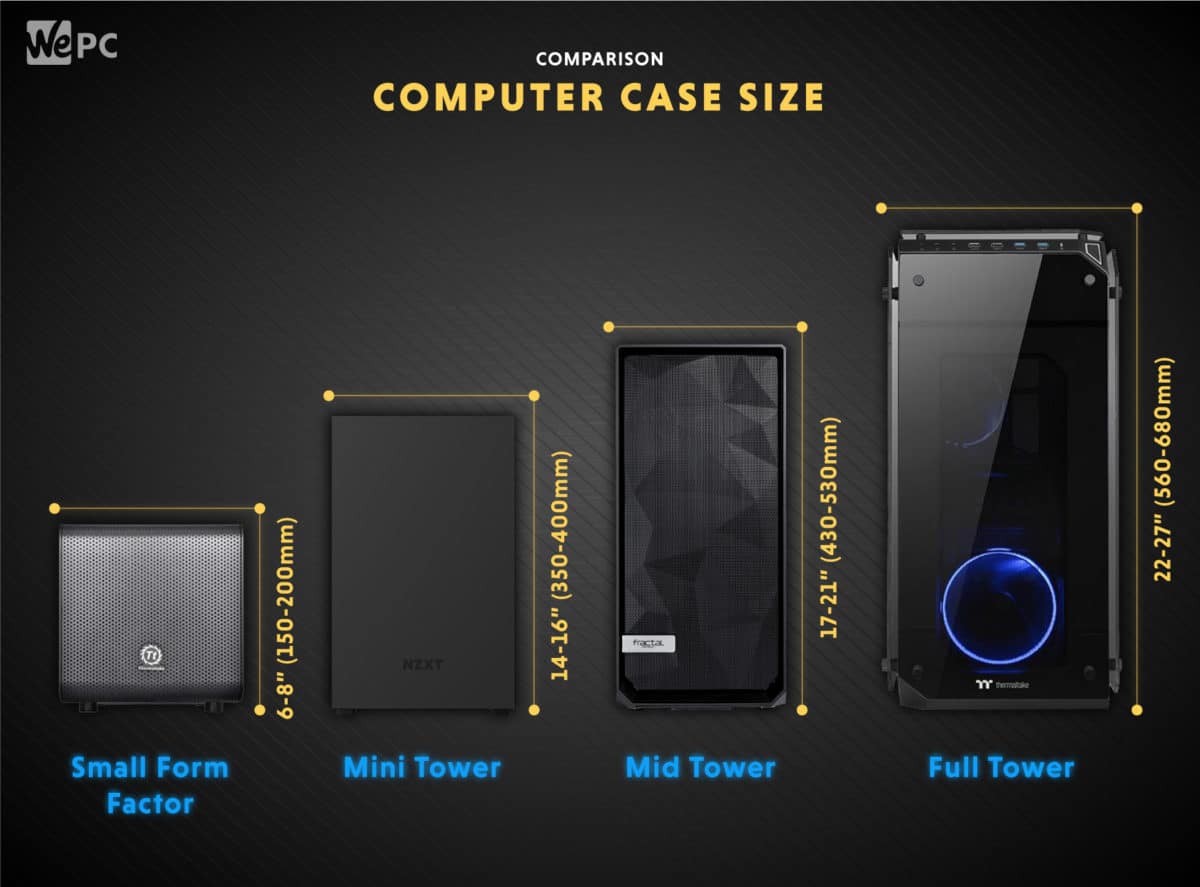
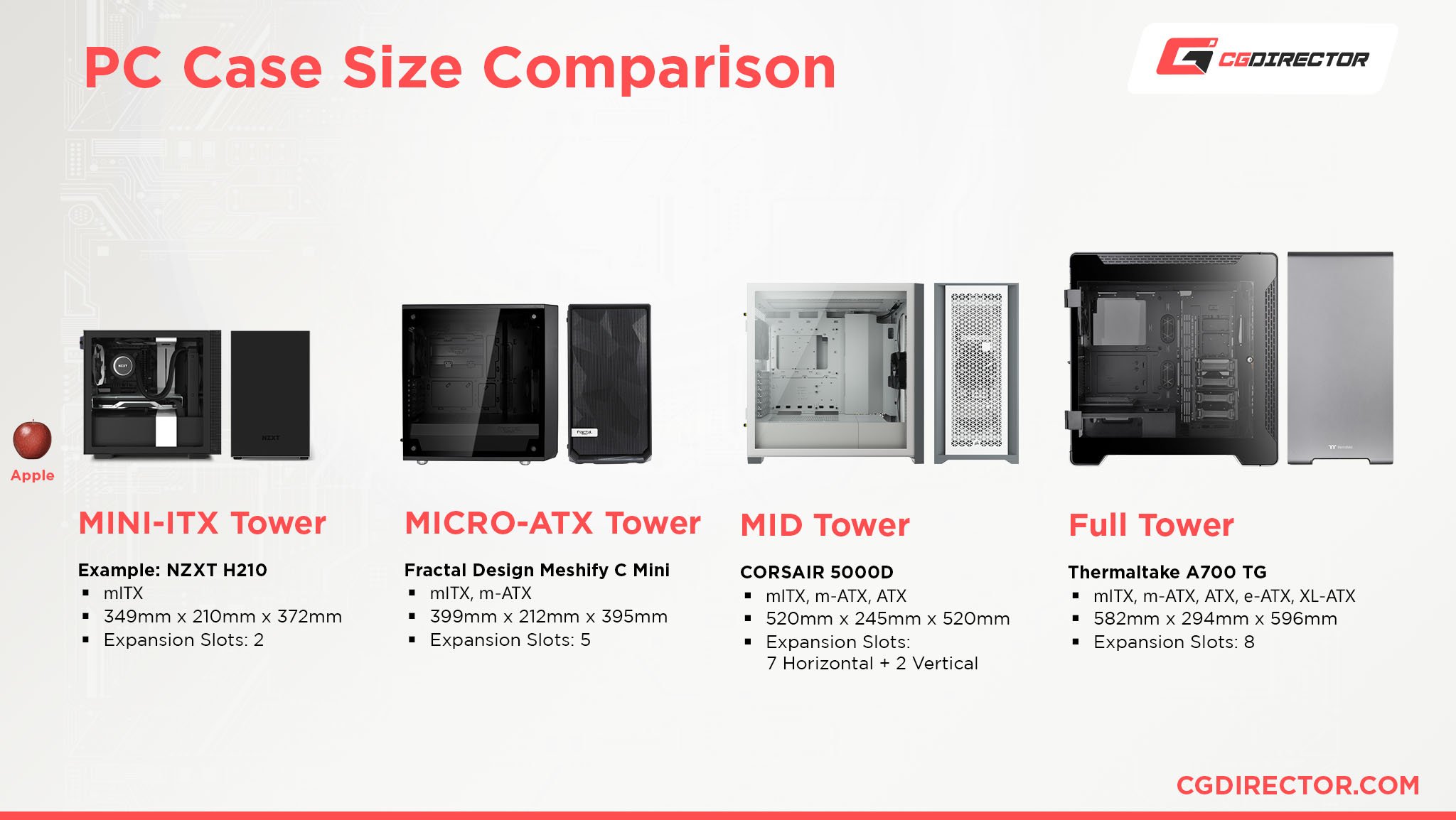
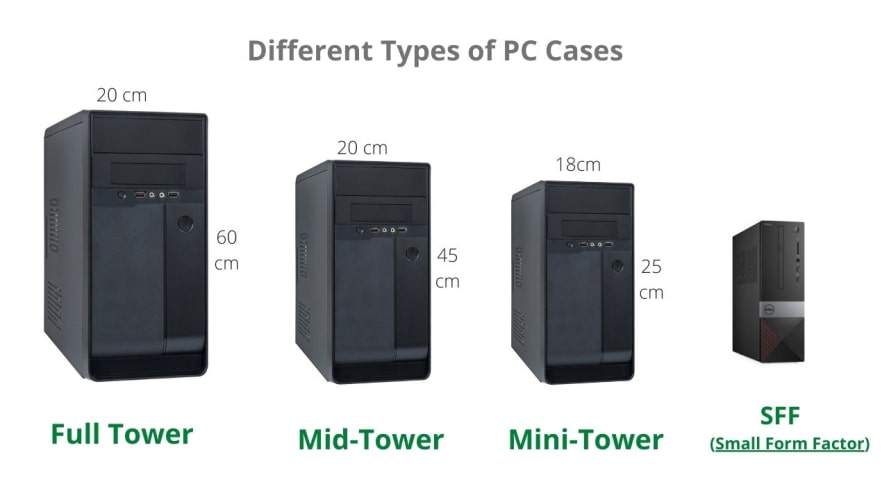
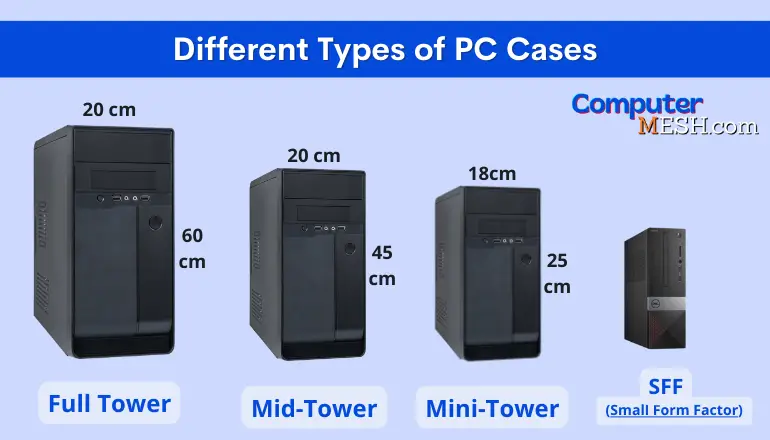
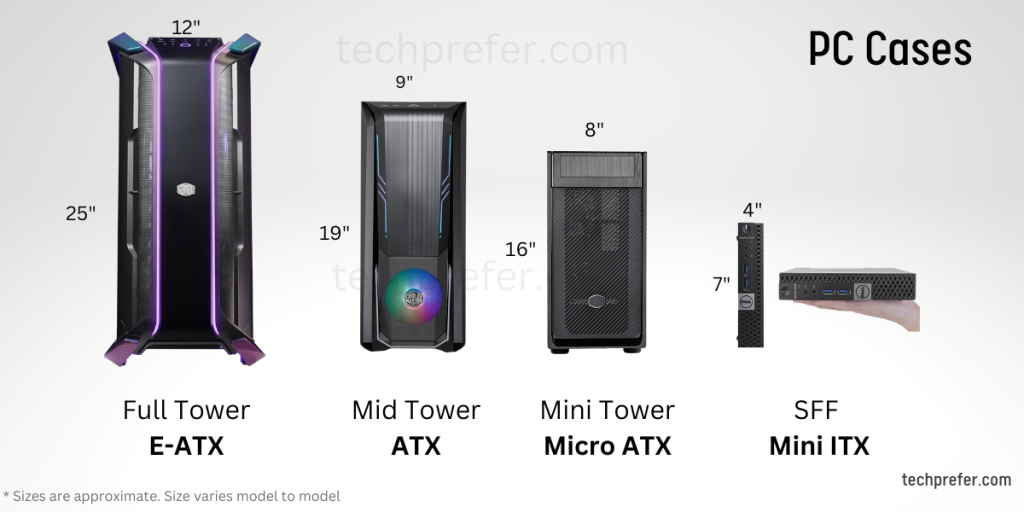
The primary computer case size categories for gamers remain largely consistent, focusing on motherboard compatibility: Mini ITX (Small Form Factor), Micro ATX, Mid Tower (the most popular), and Full Tower. Each category caters to different needs, from ultra-compact builds for minimalist setups to expansive cases for high-end components and custom cooling. Recent trends show increased innovation in smaller cases, allowing powerful gaming rigs in much tighter footprints.
How crucial is it to match my motherboard with the correct computer case size?
Matching your motherboard with the correct computer case size is absolutely crucial and non-negotiable. A case is designed to support specific motherboard form factors (e.g., Mini ITX, Micro ATX, ATX, E-ATX). Attempting to fit an incompatible motherboard will either be impossible or result in significant installation issues, wasted time, and potential damage to components. Always check the case specifications for supported motherboard sizes before purchase.
Can I build a powerful gaming PC in a Mini ITX case without overheating?
Yes, absolutely! Building a powerful gaming PC in a Mini ITX case without overheating is entirely feasible in 2026, thanks to advancements in compact component design and sophisticated SFF case engineering. Many high-end Mini ITX cases feature intelligent airflow paths, support for large AIO liquid coolers, and accommodate full-sized graphics cards. The key is careful component selection, prioritizing efficient coolers, and meticulous cable management to ensure optimal thermal performance in the smaller chassis.
What are the advantages of a Mid Tower case for the average gamer?
For the average gamer balancing life and leisure, a Mid Tower case offers numerous advantages. It strikes an ideal balance between size, component compatibility, and affordability. Mid Towers easily accommodate standard ATX motherboards, most high-end GPUs, and robust cooling solutions, providing ample space for upgrades and good cable management. This versatility makes them highly forgiving for first-time builders and excellent value for money, preventing common setup headaches.
Why might a gamer choose a Full Tower case over a Mid Tower?
A gamer might choose a Full Tower case over a Mid Tower for several specific reasons, primarily related to extreme performance, customization, and future-proofing. Full Towers offer maximum space for oversized components, multiple GPUs, extensive custom liquid cooling loops with large radiators, and abundant storage drives. They provide superior airflow due to their sheer volume and are ideal for enthusiasts building showpiece rigs or those who frequently upgrade and need unrestricted internal access and component options.
How does case size affect future hardware upgrades for my gaming PC?
Case size significantly impacts future hardware upgrades. A smaller case, like Mini ITX or some Micro ATX models, can severely limit your upgrade options for components such as longer graphics cards, larger CPU coolers, or additional storage drives. Conversely, a Mid Tower or Full Tower case provides ample headroom for installing more powerful and physically larger components as they become available, making your initial investment more future-proof and reducing the need for another case purchase down the line.
Are there any specific computer case sizes optimized for quiet operation?
While case size itself doesn't directly optimize for quiet operation, certain case designs across all sizes are specifically engineered for it. Cases with features like sound-dampening foam panels, solid front panels (rather than mesh), enclosed fan mounts, and dedicated baffling can significantly reduce noise. Often, these quiet-optimized cases might slightly compromise on maximum airflow compared to performance-focused mesh cases, but for gamers who prioritize a silent experience for streaming or focused play, these specialized cases are a popular choice.
Ever felt that pang of frustration when your shiny new graphics card just won't quite fit into your existing PC case? Or maybe you're trying to build a sleek new gaming rig, but the sheer number of computer case sizes has you scratching your head, worried you'll pick something too big, too small, or just plain wrong for your setup and lifestyle. You're not alone. For many US gamers, particularly those balancing intense gaming sessions with demanding jobs and family life, every dollar and every inch of desk space counts. With 87% of gamers regularly diving into their favorite titles, often spending 10+ hours a week, optimizing your setup for both performance and practicality is key to enjoying that valuable unwind time. This isn't just about aesthetics; the right computer case size impacts everything from cooling efficiency and component compatibility to future upgrades and even how much dust accumulates. Choosing wisely can prevent headaches, save money on potential re-buys, and ensure your PC remains a powerhouse for those competitive moments or a cozy hub for social gaming with friends. This guide will demystify computer case sizes, helping you confidently pick the perfect home for your gaming hardware without falling for hype, ensuring you get the best value and performance for your hard-earned cash.
What are the main computer case sizes and why do they matter?
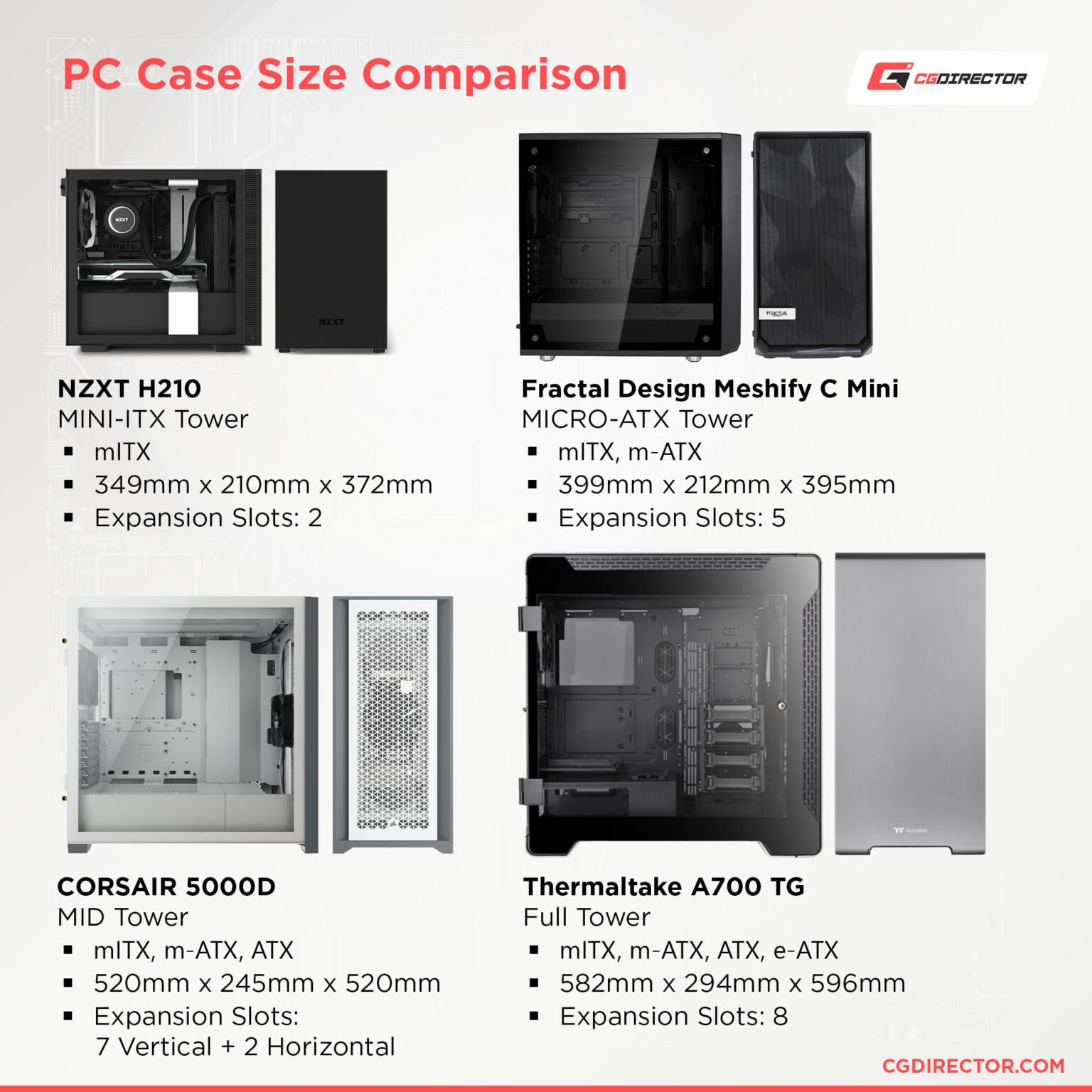
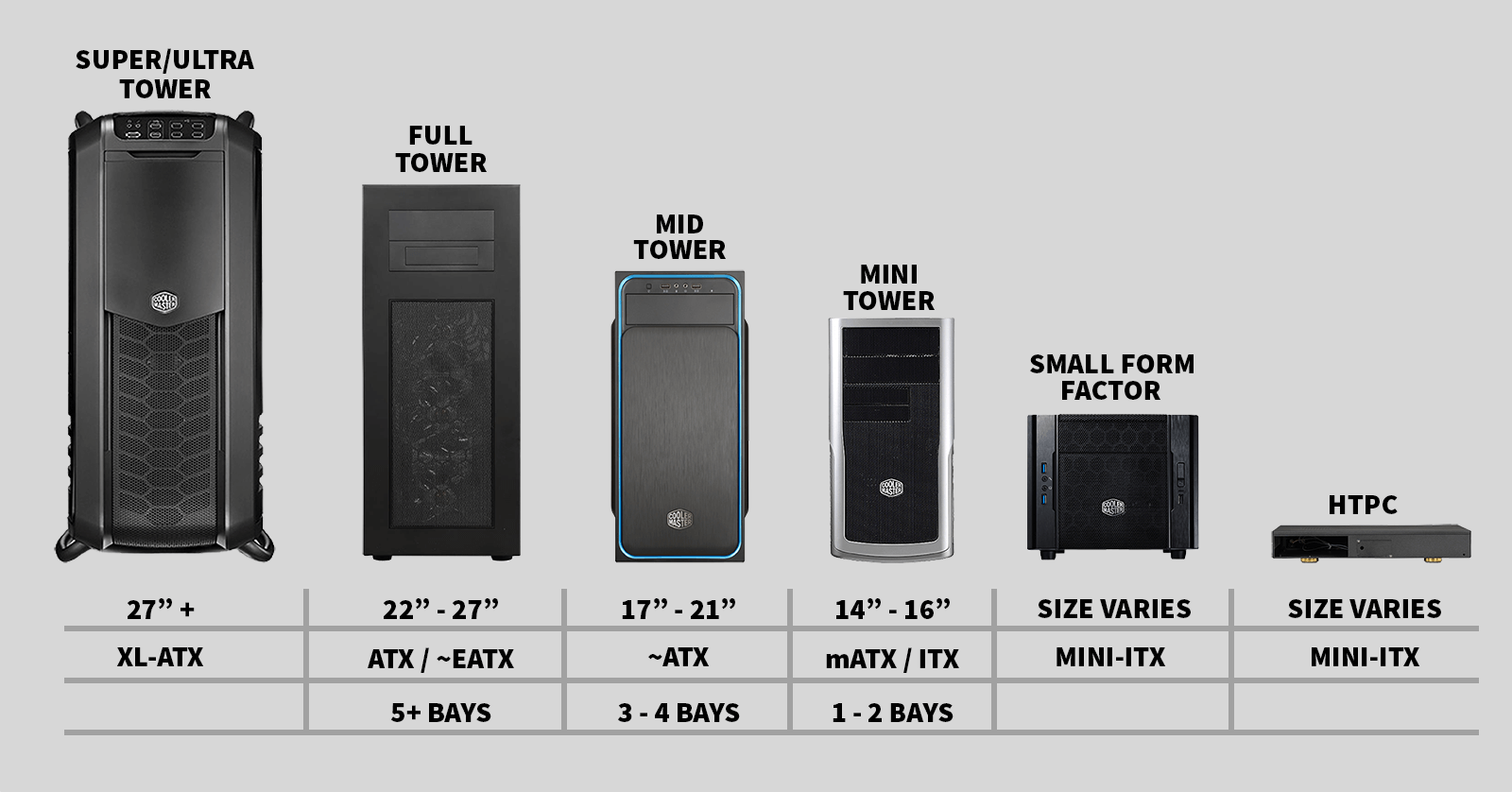
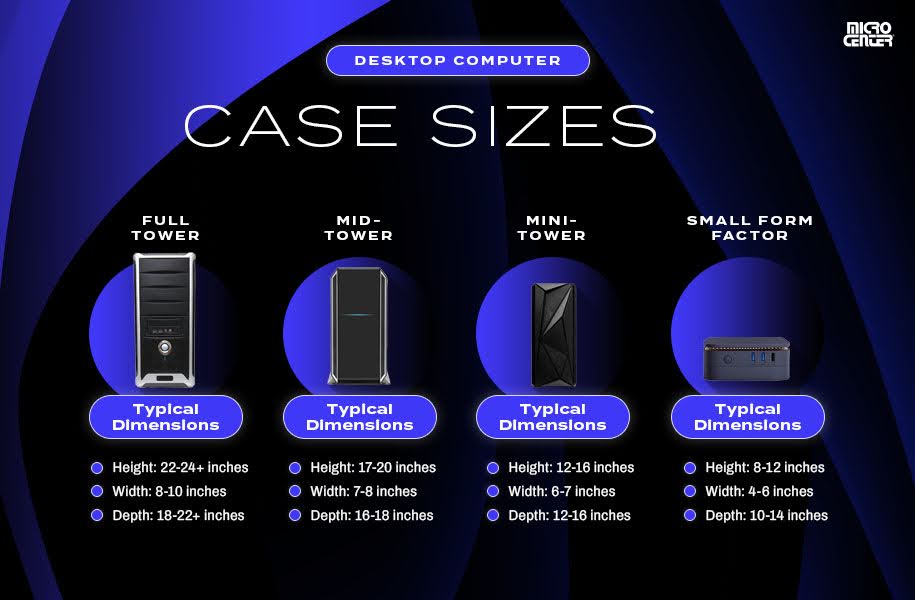
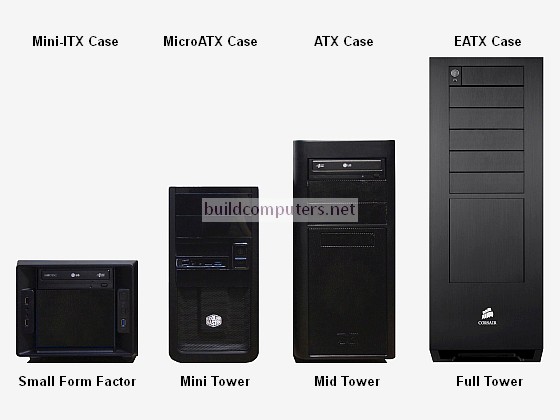
Computer case sizes are categorized primarily by the motherboard form factors they support. The most common sizes you'll encounter are Mini ITX, Micro ATX, Mid Tower (often supporting ATX), and Full Tower. These classifications dictate not just the physical dimensions of the case but also the number of expansion slots, drive bays, and the overall space for components and cooling solutions. Choosing the correct computer case size is fundamental because it determines what components you can install, how well they'll be cooled, and the potential for future upgrades.
- Mini ITX: Smallest standard size, ideal for ultra-compact builds. Supports Mini ITX motherboards.
- Micro ATX: A step up from Mini ITX, offering more expansion slots and often supporting slightly larger GPUs. Supports Micro ATX motherboards.
- Mid Tower: The most popular and versatile computer case size, accommodating standard ATX motherboards and providing ample space for high-end components and cooling.
- Full Tower: Largest consumer case size, designed for extreme performance builds, custom liquid cooling, multiple GPUs, and extensive storage. Supports E-ATX and larger motherboards.
How do computer case sizes impact component compatibility?
The size of your computer case is the primary gatekeeper for component compatibility. A larger case, like a Mid Tower or Full Tower, can house virtually any component you throw at it, from the longest graphics cards to the tallest CPU air coolers and largest radiators for liquid cooling. Conversely, a Mini ITX case demands highly specific, often smaller or low-profile versions of components. For instance, a high-performance RTX 4090 might fit in a Mid Tower, but it's a definite no-go for many Mini ITX builds without very careful planning and specific case models. Motherboard form factor is the first consideration, but you also need to check maximum GPU length, CPU cooler height, PSU length, and radiator support. Gamers often face setup issues when components don't fit, leading to frustrating returns and delays.
Which computer case size is best for a tight budget gaming PC?
For gamers on a budget, Mid Tower cases often hit the sweet spot. They offer an excellent balance of affordability, compatibility, and upgrade potential. You can find many quality Mid Tower cases that support standard ATX motherboards for under $100, providing enough room for a decent CPU cooler, a full-sized graphics card, and several storage drives without feeling cramped. While Micro ATX cases can be slightly cheaper and smaller, they might limit future upgrades or require more careful component selection, potentially leading to performance problems down the line if you compromise on cooling or GPU size. Focusing on a versatile Mid Tower allows for smart, incremental hardware upgrades on a budget, a common strategy for gamers who need to balance cost with performance over time.
Can a small form factor PC still offer high-end gaming performance?
Absolutely! The idea that small PCs can't be powerful is a relic of the past. Thanks to advancements in component miniaturization and cooling technology, a Mini ITX or Micro ATX build can absolutely deliver high-end gaming performance. Manufacturers are creating powerful, compact GPUs and efficient AIO liquid coolers that fit into tighter spaces. Many modern ITX cases are ingeniously designed to maximize airflow, often utilizing vertical GPU mounting or unique chamber layouts. You can easily find benchmarks this month showing compact builds running the latest AAA titles at ultra settings. The trade-off often lies in higher component costs (due to specialized compact versions), more challenging cable management, and potentially higher temperatures if cooling isn't meticulously planned. For gamers valuing desk space and portability, a small form factor PC is a fantastic, viable option for top-tier gaming.
How does case size affect cooling and airflow in a gaming rig?
Case size profoundly impacts cooling and airflow, which in turn directly affects your PC's performance and longevity. Larger cases, like Mid and Full Towers, generally have more space for larger fans (140mm vs. 120mm), more fan mounting points, and greater clearance for robust air coolers or multi-radiator liquid cooling setups. This ample space allows for unobstructed airflow paths, drawing cool air in and expelling hot air efficiently. Smaller cases, especially Mini ITX, have less internal volume, which can lead to heat buildup if not designed properly. They rely heavily on effective fan placement, custom cooling solutions, and components that generate less heat. While smart design can mitigate issues, a cramped small case with poor airflow can lead to thermal throttling, reduced component lifespan, and a less stable gaming experience — a common performance problem gamers want to avoid.
What are the pros and cons of different computer case sizes?
Understanding the trade-offs is crucial when choosing your computer case size. Each size category offers distinct advantages and disadvantages:
Mini ITX Cases (Small Form Factor - SFF)
- Pros: Extremely compact, minimalist aesthetic, portable, saves desk space. Great for living room gaming PCs or clean setups.
- Cons: Limited component compatibility, challenging to build in, often higher cost for specialized components, potentially restricted cooling options, difficult cable management.
Micro ATX Cases
- Pros: Good balance of size and compatibility, generally more affordable than Mini ITX, supports decent GPUs and cooling.
- Cons: Fewer expansion slots than ATX, can still be tight for very large GPUs or custom liquid cooling.
Mid Tower Cases (ATX)
- Pros: Most popular and versatile, excellent component compatibility, ample space for cooling and cable management, wide range of designs and prices, great for upgrades.
- Cons: Larger footprint than SFF, may not fit in very tight spaces.
Full Tower Cases (E-ATX)
- Pros: Maximum compatibility for all components, extensive cooling options (multiple large radiators), superior cable management, ideal for enthusiasts and custom builds, excellent airflow.
- Cons: Very large footprint, heavy, often more expensive, can look empty with minimal components.
When should I consider upgrading my computer case size?
You should consider upgrading your computer case size when your current case is bottlenecking your performance, limiting your upgrade path, or causing significant frustrations. Common triggers include:
- Component Upgrade Needs: Your new, longer graphics card or taller CPU cooler simply won't fit.
- Thermal Issues: Your PC is consistently running hot, even with optimized fan curves, indicating insufficient airflow or cooling capacity in your current case.
- Future-Proofing: You plan to add more storage, another GPU, or a custom liquid cooling loop, and your current case lacks the space.
- Ease of Maintenance: You're tired of struggling with cable management or having no room to work inside your PC.
- Aesthetics/Ergonomics: You want a cleaner look, better desk integration, or a change in your setup's visual appeal. This month's trends often highlight sleek, functional designs that might inspire a change.
Upgrading your case can be a cost-effective way to improve performance and quality of life without overhauling your entire system.
Are there trendy computer case designs that balance aesthetics and function?
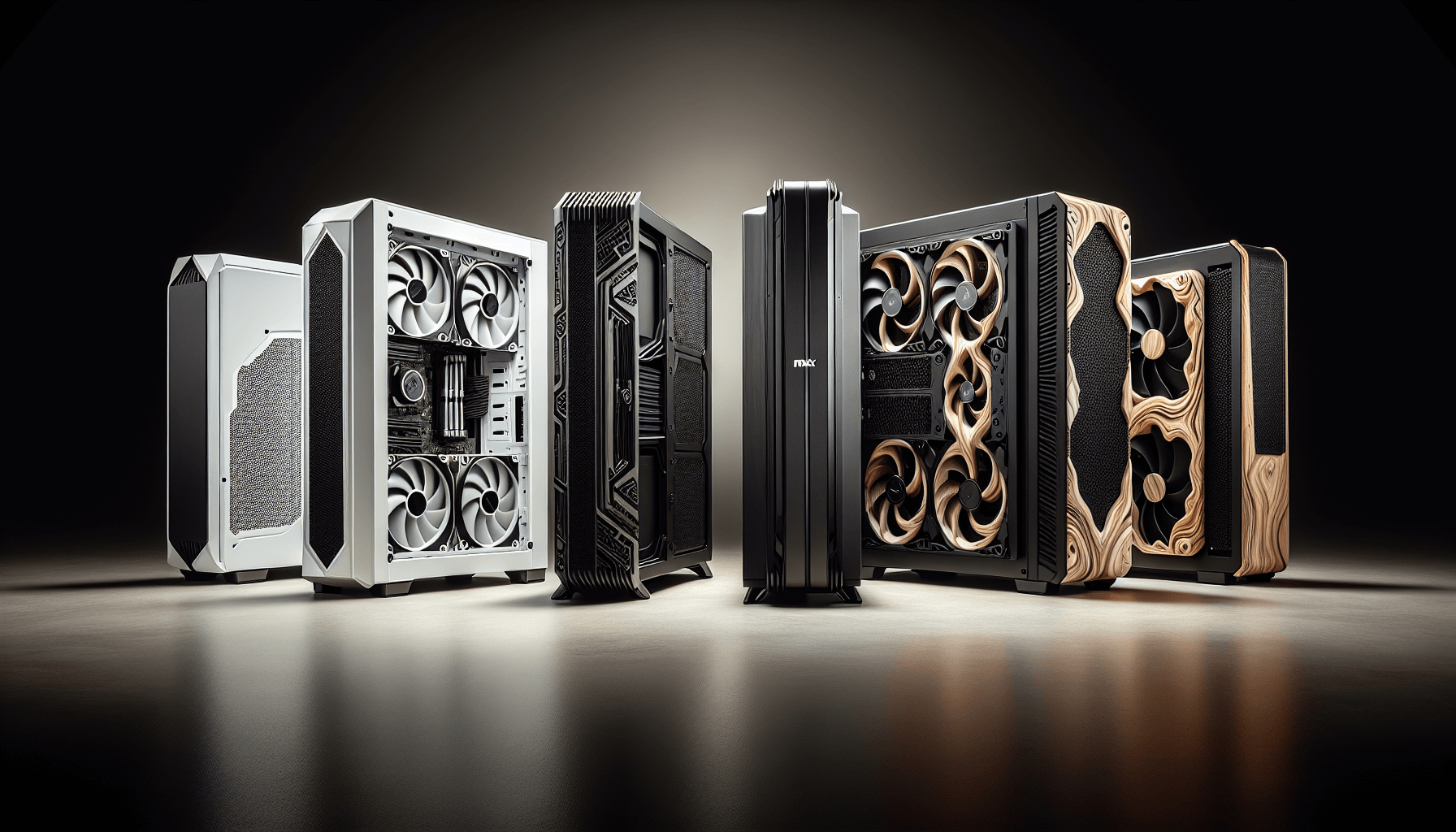
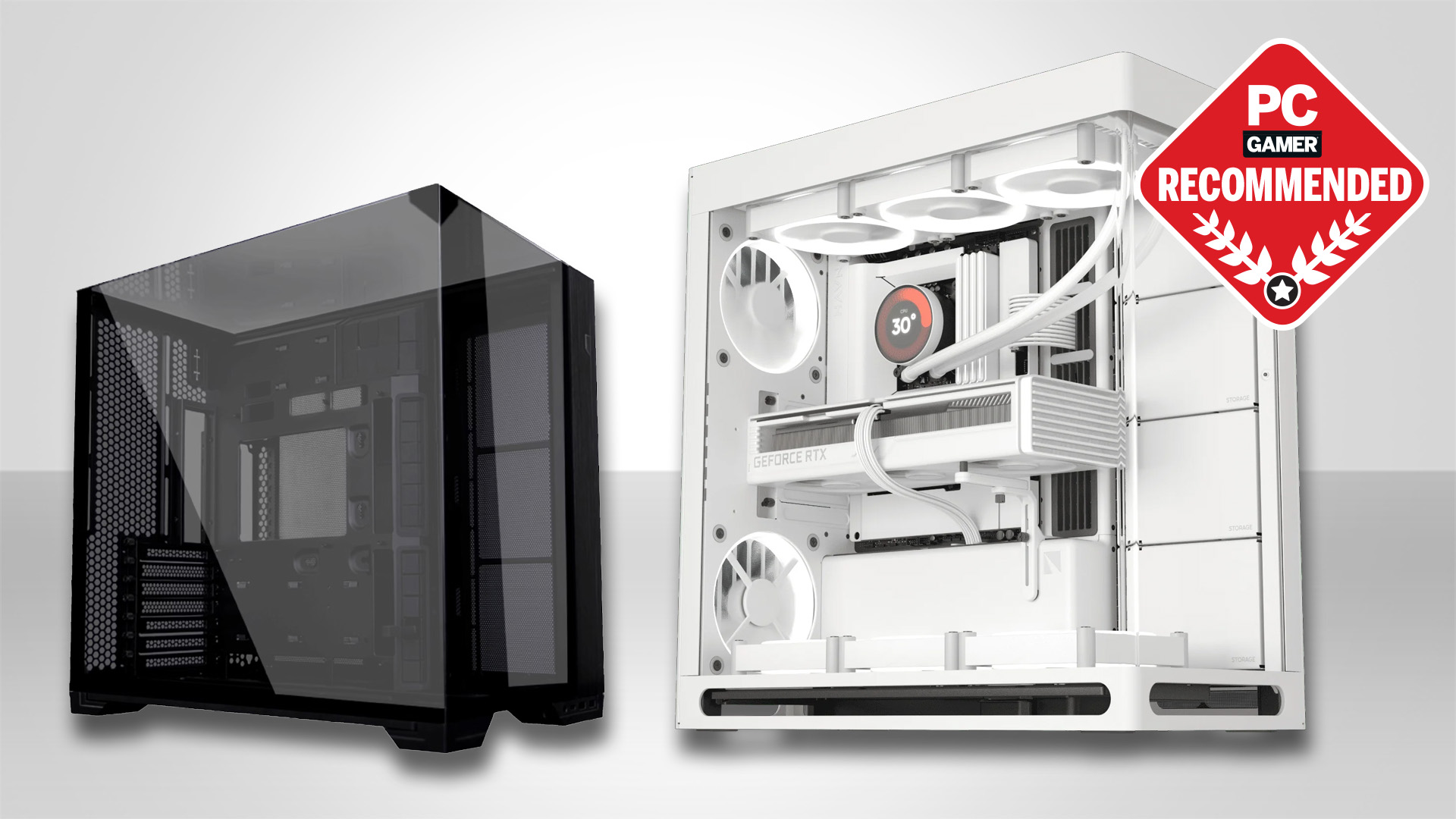
Absolutely, the PC case market is constantly evolving, with several trends dominating in 2026 that beautifully blend aesthetics and function. Transparent side panels, often tempered glass, remain incredibly popular, allowing gamers to showcase their RGB components and meticulous cable management — a reflection of the pride in their build. Minimalist designs with clean lines and subtle lighting are also very much in vogue, appealing to those who prefer a sophisticated look over flashy gamer aesthetics. Furthermore, cases with excellent out-of-the-box airflow, featuring mesh front panels or innovative internal layouts, are highly sought after. We're seeing more cases that not only look good but prioritize efficient cooling and easy buildability, addressing common pain points like heat management and complex setups. Brands are also pushing modular designs, allowing for customizable layouts and easier future upgrades, which resonates strongly with budget-conscious gamers.
How to measure your space for a new computer case?
Before you even think about buying a new computer case, accurately measuring the space where it will sit is non-negotiable. This prevents the frustrating situation of getting a beautiful new case only to find it doesn't fit under your desk or on your shelf. Grab a measuring tape and note down the height, width, and depth of your available space. Remember to account for extra clearance behind the case for cable management and airflow, especially if your exhaust fans are rear-mounted. Also, consider the clearance for side panel removal if you'll be performing frequent internal maintenance. If your space is particularly tight, look at specific case dimensions provided by manufacturers, paying close attention to the listed cubic volume or length/width/height measurements. A smart measurement now saves a huge headache later.
What common mistakes do gamers make when choosing a PC case?
Even seasoned gamers can trip up when selecting a PC case. Here are some common mistakes to avoid:
- Ignoring Component Clearance: The biggest blunder. Not checking maximum GPU length, CPU cooler height, or PSU length against the case's specifications. This leads to parts not fitting.
- Underestimating Cooling Needs: Choosing a beautiful but airflow-restricted case for a high-performance, heat-generating build. Good cooling is vital for sustained performance.
- Forgetting Cable Management: A case with poor cable routing options turns building into a nightmare and hinders airflow. Look for cases with cutouts, tie-down points, and space behind the motherboard tray.
- Overspending for Aesthetics: While looks matter, don't sacrifice core functionality like airflow or component compatibility purely for RGB or a fancy design.
- Not Planning for Future Upgrades: A case that barely fits your current components might severely limit your ability to upgrade later, forcing another case purchase sooner than expected.
- Ignoring Noise Levels: Some cases prioritize airflow over noise dampening. If a quiet build is important, check reviews that mention acoustics.
Choosing the right computer case size might seem like a minor detail, but as we've explored, it's a foundational decision that impacts nearly every aspect of your PC gaming experience. From ensuring all your high-performance components fit comfortably to optimizing airflow for peak thermal efficiency and planning for those inevitable future upgrades, a well-chosen case acts as the silent backbone of your setup. Remember, whether you're building a compact Mini ITX powerhouse for a minimalist desk or a sprawling Full Tower battle station for ultimate customization, the goal is always the same: a stable, enjoyable, and efficient gaming experience that fits your life and your budget. Don't let component compatibility or thermal worries become another pain point in your gaming journey. Take these insights, measure your space, assess your needs, and build a rig that truly serves you.
What's your biggest gaming setup challenge right now? Comment below!
FAQs about Computer Case Sizes
How important is motherboard form factor when picking a case? Motherboard form factor is the single most critical factor, as cases are designed to fit specific motherboard sizes (e.g., Mini ITX, Micro ATX, ATX, E-ATX). Always ensure your chosen case supports your motherboard.
Can I put an ATX motherboard into a Micro ATX case? No, an ATX motherboard is physically larger than what a Micro ATX case is designed to hold. You need a Mid Tower or Full Tower case for an ATX motherboard.
Do larger cases always have better cooling? Generally, yes, larger cases offer more space for larger fans, more fan mounts, and better radiator support, leading to superior airflow and cooling potential. However, a well-designed smaller case can still offer excellent cooling.
What is an SFF PC? SFF stands for Small Form Factor PC, which refers to compact computer builds, typically using Mini ITX motherboards and highly optimized components, popular for saving space and portability.
Is cable management easier in larger cases? Yes, larger cases typically provide more space behind the motherboard tray and dedicated channels or tie-down points, making cable management significantly easier and improving internal airflow.
Should I prioritize aesthetics or function for my PC case? While aesthetics are appealing, prioritize function (component compatibility, cooling, build quality) first. A case that looks great but throttles your expensive components isn't a good investment for a gamer.
Understanding computer case sizes is crucial for PC builders and gamers to ensure component compatibility thermal efficiency and future upgradeability. Different case sizes such as Mini ITX Micro ATX Mid Tower and Full Tower cater to various needs from compact gaming setups to high-performance workstations. Choosing the right case impacts airflow cable management and the ease of installation for components like motherboards graphics cards and coolers. Gamers often prioritize cases that balance performance aesthetics and a reasonable footprint, especially those balancing gaming with work and family life. This guide helps demystify case sizes providing practical tips for selecting the ideal chassis for your specific gaming rig and budget.
35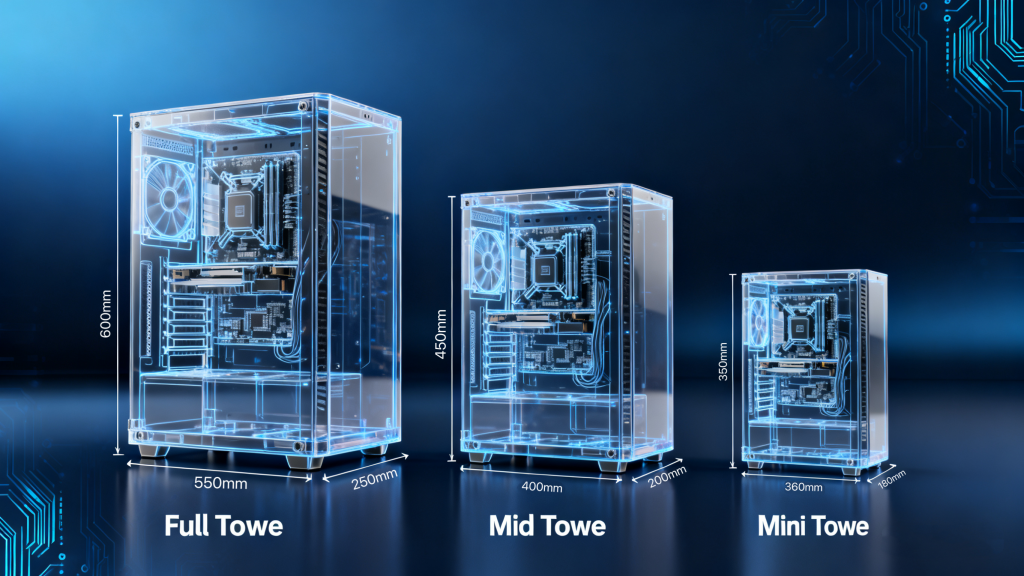

Computer Case Size Buying Guide ??3 1024x576 . Pc Case Comparison Size At Joshua Mayes Blog PC Case Size Comparison 1 1536x1536 . The Complete Guide To PC Case Sizes EATX Vs ATX Vs MATX Vs MITX PC Case Sizes Cover Image 2048x1766 . Case 2026 Case Definition Types Examples MedienHome De Voltcave Case Sizes . How To Choose A PC Case Everything To Consider 2022 Different Case Sizes


The Complete Guide To PC Case Sizes EATX Vs ATX Vs MATX Vs MITX Comptuer Case Size Comparison 1024x702 . Computer Case Sizes Explained A Micro Center Guide Images Case Sizes Explained Graphic . Atx Computer Case Sizes ATX Case Sizes Explained Find Your Perfect PC Case Sizes Graphic . Which PC Case Size Is Best For Your Next Build Computer Case Size Comparison . Pc Case Sizes Size Comparison Types Of Computer Cases ESAUFF 81UsdekrJ2L


Pc Computer Case Sizes BEST GAME CONSOLE Computer Case Sizes.webp. Pc Case Sizes Size Comparison Types Of Computer Cases ESAUFF Pc Case Size Comparison . Pc Case Sizes Chart Types Of Computer Cases PQRB Computer Case Size Comparison 1200x887 . Gaming Pc Case Dimensions Infoupdate Org PC Case Size Comparison Graphic . Desktop PC Case Size 2026 PC Case Sizes Feature Image.webp


Laptop Computer Case Sizes At Connie Beach Blog 0e420afd 5975 47dd Ba7a PT0 SX970 V1 . How To Choose And Install A Case For Your Custom PC Colour My Tech Types Of Computer Cases By Size . The 15 Best PC Cases Of 2026 What In Tech Best PC Case Brand 1536x1152 . How Big Is A Mini Tower Case Size In Cm Infoupdate Org Types Of Computer Cases Ad Their Sizes . Computer Tower Case Sizes How To Choose The Right Pc Case Size For Any Build Game Rant Feature


Lian Li Reveals A Trio Of PC Cases At Computex 2024 OC3D 20240605 121847 Scaled . PC Case Sizes Explained All Form Factors Available In 2026 TechRadar 1200 80 . Buyer S Guide 5 Computer Case Sizes . Pc Case Dimensions Comparison At Benjamin Ferguson Blog C863bd57 89e0 477f 882f PT0 SX970 V1 . Wow Worthy Builds Only The 12 Top PC Cases We Saw At CES 2026 PCMag 43.fit Lim.size

Which Computer Case Size Is Best For Your Next Custom PC Build WePC Computer Case Sizes PC Case Sizes . Mini Tower Pc Case Size The Best Full Tower PC Cases For 2024 XBWZUE Twenty8two Deepcool Pc Chassis Case Dimensions Pc Master Race . PC Case Size Guide Everything You Need To Know PC Guide Best Case For RTX 5090 In 2025 Our Top Choices . Pc Case Size Comparison The Different PC Case Sizes Explained From Pc Cases 1024x512 . PC Case Sizes Difference Between All Sizes Explained PC Case Sizes 1 150x98



Best PC Cases UK 2026 6 Tested Ranked By Experts Best PC Cases UK 2026 6 Tested Ranked By Experts F1bfa0a7 . The Complete Guide To PC Case Sizes EATX Vs ATX Vs MATX Vs MITX Unique PC Case Cover 1536x1195 . What Is A Computer Frame . The 9 Best PC Cases In 2022 Voltcave Best PC Cases . What Is A Mid Tower Case At Rosie Halsey Blog Computer Case Size Comparison